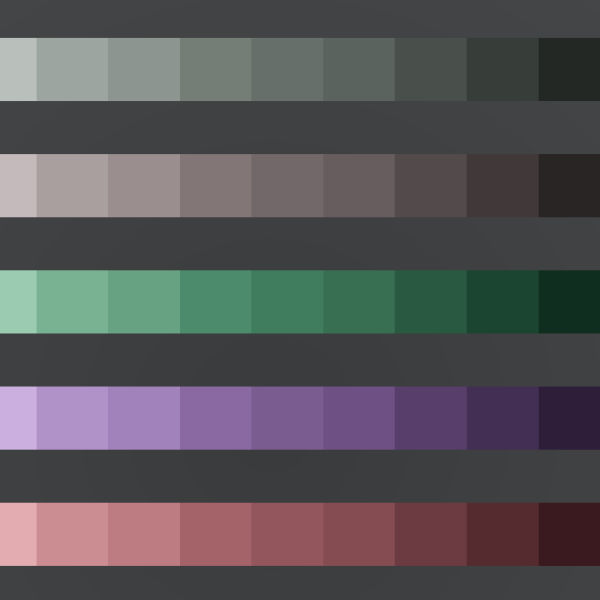
Theme Machine: A CSS Color Palette Tool
Sometimes, I just want to start building a project.
I’ll create a new stylesheet, define my base styles and a handful of custom properties, and start coding. Before I know it, I realize I need a couple more colors. I’ll either just define an ad-hoc color right there in the stylesheet, or, if I’m being disciplined, I’ll define a new custom property for it and use it accordingly.
But I always find I need more colors. I need a whole spectrum to choose from. I know I can, and maybe should, start by dropping in a bunch of colors from Open Color or Open Props, but what I really want are my colors. I want to choose my own tint of blue, or green, or red.
So I finally set aside the project that needed those colors, and built a tool to help with that. Don’t ask me where this lands on that old XKCD efficiency chart.
I’ve called this the Theme Machine. It’s really two tools in one.
Color picker 
First is the Color Picker. This is a color wheel, with draggable handles for selecting colors. It can automate choosing complimentary colors, or analagous colors adjacent to one another, or two sets of complimentary colors.

If you already have a primary brand color, you can paste that in the input field in any valid CSS format. Or, just have fun playing with the wheel until you find a color that speaks to you. Toggle the mode between complimentary, analagous, split complimentary, or even freestyle color schemes to find other colors that go with your selection.
Adjust the lightness or vividness (chroma) sliders, and all the colors will adjust together to remain harmonious. You’re basically working with OKLCH color directly.
It will warn you if your colors are out gamut for most displays. Fix this if you can, but don’t sweat it too much unless several of your colors show the warning; you’ll be able to fine tune each color further in the next step.
Palette generator 
When you like your colors, click the button at the bottom to export them to the second tool, the Palette Generator.

For each of the colors you selected, the Theme Machine will generate an entire spectrum of shades from white to black. It will also provide an “accent” color that’s the fully vivid version of the color you chose. It will make an educated guess at good names for those colors which will be used to produce the custom properties.
Depending on the colors you chose, it will also generate one or two neutral tones and a spectrum of shades for those as well.
Each palette can be renamed or otherwise adjusted to your liking. You can also add additional colors to your palette.
The Theme Machine creates CSS custom properties for all of your palettes. When you’re happy with your selections, copy the CSS on the right and drop it into your project.
Give it a go! Let me know if you have any problems, questions, or feature requests. Happy styling!